

Starter kit · Yoga, Pilates and small-group fitness
Starting a yoga or fitness studio?
Here are the first steps, straight from the official sources. Then grab a free app where members see the week’s classes, book a spot and pay for a membership.
Free to start · No credit card · Live in about 15 minutes
The first steps
Most people starting out teach small groups: in a hired room, a small studio or the local park. These are the registrations and checks that usually come first.
Step 1
Get an ABN
An Australian Business Number is free through the Australian Business Register. You quote it on your invoices.
Register for an ABN (business.gov.au)(opens in a new tab)Step 2
Register a business name, if you need one
ASIC says you must register a business name if you run a business in Australia and are not trading under your own name.
Register a business name (ASIC)(opens in a new tab)Step 3
Know when GST starts
You must register for GST once your GST turnover reaches $75,000 or more. Below that it is your choice.
Register for GST (business.gov.au)(opens in a new tab)Step 4
Look at insurance
Some states and territories need public liability insurance for certain occupations, and professional indemnity insurance is mandatory for some professions. Check what applies to the classes you teach.
Types of business insurance (business.gov.au)(opens in a new tab)Step 5
Get a licence for the music you play
You need a licence to play copyrighted music in a commercial setting, and gyms are on the list, whether it comes from a streaming service, a CD or the radio. OneMusic offers a single licence for businesses.
Playing music in your business (business.gov.au)(opens in a new tab)Step 6
Ask before you teach in a park
Councils set the rules for paid classes in parks. In Brisbane, fitness classes and personal training count as commercial activity, and you must apply for permission first. Check your own council.
Commercial activity in a park (Brisbane City Council)(opens in a new tab)Step 7
Health forms mean the Privacy Act applies
Small businesses are often outside the Privacy Act, but private sector health service providers must comply whatever their turnover, and business.gov.au lists gyms among them. If you collect health details, read what you must do with them.
Protect your customers’ information (business.gov.au)(opens in a new tab)Step 8
Bringing in other teachers
The ATO says to work out whether each worker is an employee or an independent contractor, because it affects your tax, super and other obligations.
Employee or independent contractor (ATO)(opens in a new tab)Step 9
Work through the full checklist
business.gov.au has a step-by-step guide to starting a business, with a checklist you can download.
Starting a business guide (business.gov.au)(opens in a new tab)
General information only, not legal, tax or financial advice. Rules change, so check each official page (links checked 19 November 2026) or ask an accountant for your situation.
Your studio app, free to start
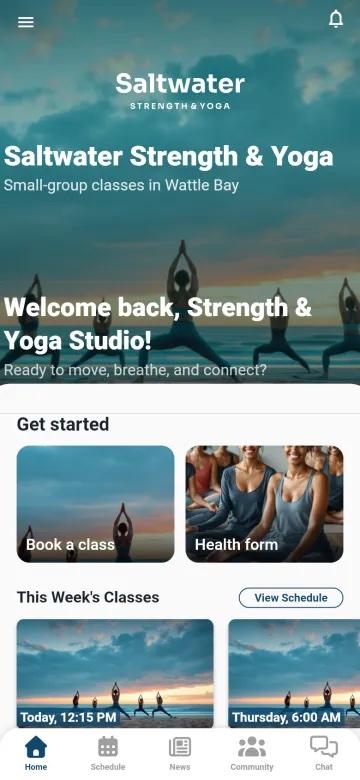
Copy our Strength & Yoga Studio template into your own app, put your studio’s name, logo and colours on it, and send your members the join link today. It suits yoga, Pilates, strength and any small-group class.
Free plan: no credit card. Class, membership and shop payments go straight into your own Stripe account, with a 2% platform fee.
This week’s classes
Your timetable on the home screen and in the calendar, so members always know what is on.
Book a spot
Members book a class from their phone, so you know who is coming before you unlock the door.
Memberships
Members choose a membership and pay in the app.
A health form
New members fill in a health form on their phone before their first class, and it is kept on file.
A studio shop
Sell mats, merch and anything else you stock.
Your community
News, a forum and chat keep members talking between sessions.
You like it. Now what?
Here’s every step, from tapping the button to your members booking their first class. You can do all of it yourself.
Get your free copy
Tap Get the free app and create your account. No credit card. We make you an exact copy of the template, every screen and feature.
Put your studio’s name on it
Type your studio’s name, then upload your logo and choose your colours, or skip it for now and do it later.
Set your classes and prices
In your dashboard, open Bookings and change the sample classes to yours: what you teach, how long it runs and what it costs. Add your timetable to the calendar.
Set your memberships and health form
Change the sample memberships to your own, and the health form to the questions you ask. Connect your Stripe account under Payments, and payments are deposited directly into it, with a 2% platform fee.
Stock the studio shop
Add what you sell under Products, or leave the shop out until you need it.
Invite your members
Share your join link or QR code from Share app: on the studio door, in your group chat or by email. Members get your app from the App Store or Google Play, or open it in a web browser.
Keep everyone in the loop
Post studio news, and send a push notification to members’ phones when a class moves or a new one opens.
Grow when you’re ready
Start on the free plan. When you want more, the paid plans are on the pricing page.