

Starter kit · Handyman and small trade jobs
Starting a handyman business?
Here are the first steps, straight from the official sources. Then grab a free app where a customer fills in your enquiry form and gets a priced quote straight away.
Free to start · No credit card · Live in about 15 minutes
The first steps
Most people starting out as a handyman work alone, from a ute, on small jobs around the house. The licence rules here are Queensland’s; other states have their own, so check yours.
Step 1
Get an ABN
An Australian Business Number is free through the Australian Business Register. You quote it on your quotes and invoices.
Register for an ABN (business.gov.au)(opens in a new tab)Step 2
Register a business name, if you need one
ASIC says you must register a business name if you run a business in Australia and are not trading under your own name.
Register a business name (ASIC)(opens in a new tab)Step 3
Know when GST starts
You must register for GST once your GST turnover reaches $75,000 or more. Below that it is your choice.
Register for GST (business.gov.au)(opens in a new tab)Step 4
Know when you need a QBCC licence
In Queensland you need a QBCC licence to contract for building work valued over $3,300. QBCC says a handyman does not need one as long as the job is worth no more than $3,300, is not electrical or plumbing work and does not need an occupational licence.
When you need a licence (QBCC)(opens in a new tab)Step 5
Plumbing and drainage need a licence at any size
QBCC says you need an occupational licence for plumbing and drainage work regardless of the value of the job, so even a small plumbing fix is not handyman work.
When you need a licence (QBCC)(opens in a new tab)Step 6
Leave electrical work to a licensed electrician
Queensland’s Electrical Safety Office says to always use a licensed electrician for electrical jobs, even replacing the plug on an extension lead. The QBCC handyman exemption does not cover electrical work either.
Don’t do it yourself (Electrical Safety Office)(opens in a new tab)Step 7
Put bigger jobs in writing
QBCC says you need a written contract for domestic building work priced over $3,300, including labour, materials and GST. QBCC also has a simple contract for small jobs up to $3,300.
Domestic building contracts (QBCC)(opens in a new tab)Step 8
Keep deposits within the limit
QBCC caps deposits on domestic building work: 20% for work valued at $3,300 or less, and 10% from $3,301 to $19,999. Set the deposit on your quotes to match.
Deposits and progress payments (QBCC)(opens in a new tab)Step 9
Look at insurance
Public liability insurance covers you if someone is hurt or their property is damaged because of your negligence, and some states and territories need it for certain occupations. Check what applies to the work you do.
Types of business insurance (business.gov.au)(opens in a new tab)Step 10
Bringing in a helper
The ATO says to work out whether each worker is an employee or an independent contractor, because it affects your tax, super and other obligations.
Employee or independent contractor (ATO)(opens in a new tab)Step 11
Work through the full checklist
business.gov.au has a step-by-step guide to starting a business, with a checklist you can download.
Starting a business guide (business.gov.au)(opens in a new tab)
General information only, not legal, tax or financial advice. Rules change, so check each official page (links checked 21 November 2026) or ask an accountant for your situation.
Your quoting app, free to start
Copy our Trade Quotes template into your own app, put your business name, logo and colours on it, and send customers your enquiry form today. It suits handyman work and any small trade that quotes from a price list.
Free plan: no credit card. Deposits and payments go straight into your own Stripe account, with a 2% platform fee.
Instant quotes from a form
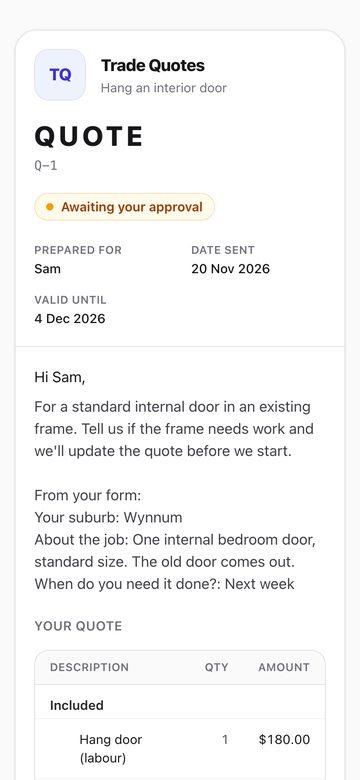
A customer fills in your enquiry form with their suburb, the job and when they need it. The matching price list goes back to them as a quote straight away.
Three sample price lists
Hang an interior door, mount a TV and clean the gutters, each with what is included, a recommended extra and optional extras. Change them to your own jobs and prices.
Customers tick the extras
The quote shows recommended and optional extras that the customer ticks on or off, and the total updates.
Approve on their phone
Customers approve or decline the quote from their phone, and you see the answer in your dashboard. Connect Stripe and they pay the deposit you set when they approve.
A job completion sheet
Fill in a completion form at the end of each job, so there is a record of what was done.
Bookings and a calendar
Bookings, a calendar, clients and team chat sit on the home screen for when the work picks up.
You like it. Now what?
Here’s every step, from tapping the button to your first customer approving a quote. You can do all of it yourself.
Get your free copy
Tap Get the free app and create your account. No credit card. We make you an exact copy of the template, every screen and feature.
Put your name on it
Type your business name. If you have a website, add it and we pick up your logo and colours. If not, upload a logo and choose your colours, or skip it for now.
Set your jobs and prices
In your dashboard, open Quotes and change the three sample price lists to your own jobs and prices. Under Quotes settings, set your deposit and terms, keeping the deposit within the QBCC limit.
Link each form to its quote
Open each enquiry form under Forms, and in its Instant quote section pick the price list it should send. The copy clears this link, so do it once for each form.
Connect Stripe to take deposits
Connect your Stripe account under Payments, and deposits and payments are deposited directly into it, with a 2% platform fee.
Try it as a customer
Open one of your form’s public links on your phone, fill it in, and see the quote your customer will get.
Give it to your customers
Put your form links wherever customers find you: your website, Google Business Profile, Facebook and your text replies. Customers fill in the form and get your quote on their phone, with nothing to download.
Grow when you’re ready
Start on the free plan. When you want more, the paid plans and the AI receptionist add-on, which answers every call in your business’s name, are on the pricing page.